  • Personal
  • Business
  • Foundation
    Close
  • Select Region

      Select your region below to see curated info.

    • Global
    • India
    • MENA
  • mySHRM Login
  • MySHRM
    • Dashboard
    • Account
    • Logout
SHRM
  • Membership
    • Membership

      As a SHRM Member®, you’ll pave the path of your success with invaluable resources, world-class educational opportunities and premier events.

      Membership Benefits
  • Certification
    • SHRM Certification

      Demonstrate your ability to apply HR principles to real-life situations.

      • How to Get Certified
      • Eligibility Criteria
      • Exam Fees & Options
      • SHRM-CP
      • SHRM-SCP
      • Which Certification is Best for Me?
      • Recertification
      Prepare for the Exam
      • Exam Preparation
      • SHRM BASK
      • SHRM Learning System
      • Instructor-Led Learning
      • Self-Study
      Specialty Credentials

      Demonstrate targeted competence and enhance your HR credibility.

      PMQ

      Gain a deeper understanding and develop critical skills.

  • Events & Education
    • India Events

      Demonstrate your ability to apply HR principles to real-life situations.

      • SHRM Unconference
      • Tech Conference
      • India Annual Conference
      MENA Events
      • MENA Annual Conference
      Global Events
      • US Annual Conference
      Webinars
  • Resources
    • Resources

      Stay up to date with news and leverage our vast library of resources.

      • HR Research
      • Legal & Compliance
      • Latest News & Trends
      • Tools & Guides
      HR Topics
      • AI in the Workplace
      • Civility at Work
      • Compensation & Benefits
      • Inclusion & Diversity
      • Talent Acquisition
      • Workplace Technology
      • Workplace Violence Prevention
  • SHRM Connect
  • Shop
    • SHRM Store

      Shop for HR certifications, credentials, learning, events, merchandise and more.

      Workplace Essentials
      • SHRM Memberships
      • SHRM Certification
      • Specialty Credentials
      • HR Tools & Tech
      Education
      • Seminars
      • eLearning
      • Books
      Merchandise
      • Accessories
      • Apparel
      • Office & Home
Become a Member
Renew
Rejoin Now
Renew
Close
  • Personal
  • Business
  • Foundation
  • Membership
    back
    Membership
    • Membership

      As a SHRM Member®, you’ll pave the path of your success with invaluable resources, world-class educational opportunities and premier events.

      Membership Benefits
  • Certification
    back
    Certification
    • SHRM Certification

      Demonstrate your ability to apply HR principles to real-life situations.

      • How to Get Certified
      • Eligibility Criteria
      • Exam Fees & Options
      • SHRM-CP
      • SHRM-SCP
      • Which Certification is Best for Me?
      • Recertification
      Prepare for the Exam
      • Exam Preparation
      • SHRM BASK
      • SHRM Learning System
      • Instructor-Led Learning
      • Self-Study
      Specialty Credentials

      Demonstrate targeted competence and enhance your HR credibility.

      PMQ

      Gain a deeper understanding and develop critical skills.

  • Events & Education
    back
    Events & Education
    • India Events

      Demonstrate your ability to apply HR principles to real-life situations.

      • SHRM Unconference
      • Tech Conference
      • India Annual Conference
      MENA Events
      • MENA Annual Conference
      Global Events
      • US Annual Conference
      Webinars
  • Resources
    back
    Resources
    • Resources

      Stay up to date with news and leverage our vast library of resources.

      • HR Research
      • Legal & Compliance
      • Latest News & Trends
      • Tools & Guides
      HR Topics
      • AI in the Workplace
      • Civility at Work
      • Compensation & Benefits
      • Inclusion & Diversity
      • Talent Acquisition
      • Workplace Technology
      • Workplace Violence Prevention
  • SHRM Connect
  • Shop
    back
    Shop
    • SHRM Store

      Shop for HR certifications, credentials, learning, events, merchandise and more.

      Workplace Essentials
      • SHRM Memberships
      • SHRM Certification
      • Specialty Credentials
      • HR Tools & Tech
      Education
      • Seminars
      • eLearning
      • Books
      Merchandise
      • Accessories
      • Apparel
      • Office & Home
Become a Member
Renew
Rejoin Now
Renew
  • Select Region

      Select your region below to see curated info.

    • Global
    • India
    • MENA
SHRM
mySHRM Login
  • MySHRM
    • Dashboard
    • Account
    • Logout
Close

  1. Topics & Tools
  2. Employment Law & Compliance
  3. How to Make Your Careers Website Usable for People with Disabilities
Share
  • Linked In
  • Facebook
  • Twitter
  • Email

Lorem ipsum dolor sit amet, consectetur adipiscing elit. Vivamus convallis sem tellus, vitae egestas felis vestibule ut.


Error message details.

Copy button
Reuse Permissions

Request permission to republish or redistribute SHRM content and materials.


Learn More
News

How to Make Your Careers Website Usable for People with Disabilities

Scroll through your careers page and fill out your job application using some of the assistive technology below. Can you do it?

October 22, 2018 | Allen Smith, J.D.


Technical Standards

Part 3 of the 3-part series

Regardless of whether the Americans with Disabilities Act (ADA) or state law requires careers portals to be accessible, many employers want their careers websites to be so that they can recruit people with disabilities—a talent pool that could help employers fill jobs more quickly in the tight labor market. To achieve this goal, these businesses should not only strive to meet technical standards but make quick fixes and implement website-accessibility policies.

The World Wide Web Consortium's Web Content Accessibility Guidelines 2.1, published June 5, includes guidelines for making websites more inclusive, noted Corinne Weible, deputy project director of the Partnership on Employment & Accessible Technology (PEAT). While WCAG 2.1, levels A, AA and AAA (lowest, average and highest compliance), does not supersede WCAG 2.0, the consortium recommends that website designers use WCAG 2.1, even though there are "just a few minor tweaks different from WCAG 2.0," said Jonathan Lazar, a professor at Towson University in Maryland.

Nevertheless, "as WCAG 2.1 becomes more well-known, it is possible that it will replace WCAG 2.0 as the default standard," predicted Kate Gold, an attorney with Drinker Biddle & Reath in Los Angeles.

10 Tips for an Accessible Website

Weible shared PEAT's top 10 tips for making websites accessible:

  1. Screen reader compatibility. A screen reader is assistive technology that people with vision impairments can use to translate a website's information into speech or Braille. For the screen reader to work, there must be detailed and consistent navigational elements in the page structure, such as headers, titles and lists. Most operating systems today include built-in screen readers, including Narrator on Windows and VoiceOver on Mac OS X, that employers can use to test their websites. To open Narrator in Windows, click the Start button and then, in the search box, type "narrator." To turn on VoiceOver on a Mac, press the Command key plus F5. To turn it off, press F5 again.

  2. Alternative text for images. People who can't see images rely on well-written descriptive text, visible to screen readers, to understand the information images convey.

  3. Color contrast. Red-green colorblindness affects up to 8 percent of men. Ensure that they can use your website by testing your design elements for proper color contrast. Tools that can help include Chromatic Vision Simulator, which shows what your site would look like to people with different types of colorblindness, and VisionSim, which simulates several visual impairments.

  4. Keyboard accessibility. One of the easiest initial tests for accessibility is whether an individual with a disability who is using a screen reader or other adaptive technology can use a website and fill in its forms without a mouse. Can the person tab through the website content from beginning to end, or does he or she need to use a mouse?

  5. Controls for moving content. Some websites use moving content to engage users, such as animations, slideshows, videos and pop-ups. Best practices for accessibility include avoiding excessive blinking, which can induce seizures, and including a stop/pause button for users with visual-processing or cognitive disabilities.

  6. Captions. Ensure videos have captions for users who are hearing impaired.

  7. Controls for timed content. Many people using assistive technology require extra time to navigate a website and complete tasks. The user should have options to turn off or extend time-limited pages.

  8. Labeled forms. Be sure to explicitly label form fields such as boxes to check, data fields and radio or option buttons so that people using certain types of assistive technology, such as screen readers, can understand them. Labels should tell the user that they have encountered a field, explain what type of field it is, and in some cases provide additional cues to let the user know what type of information is needed.

  9. Accessible downloadable files. Any downloads on the website need to be accessible. Many savvy companies avoid this issue by adding all content directly to their website in HTML, which also simplifies navigation for mobile users. But if an employer has to include downloadable files, the files should be checked for accessibility before posting.

  10. Plain language. Simple, concise language will help all users navigate websites, including individuals with intellectual and learning disabilities, cognitive issues, traumatic brain injuries and other disabilities.


In addition, any captcha tests—used to determine whether the webpage user is human or a bot—should have an audio option.


Solution: Pair Meaningful Colors with Descriptive Text

Color Alone as an Indicator
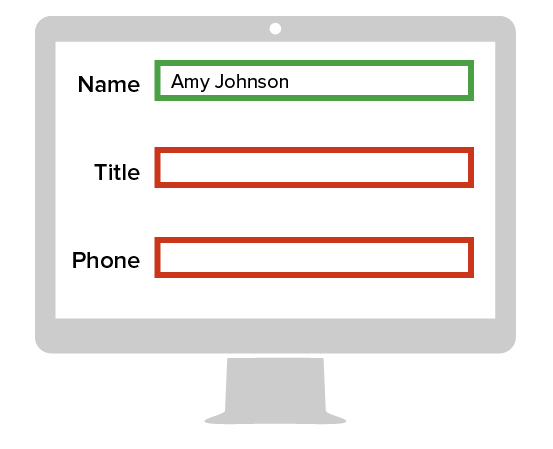
Image of a computer monitor using only color as an indicator.

Using color alone to indicate important content makes it difficult or impossible for individuals with vision impairments to understand what you are trying to communicate.

Color and Text as Dual Indicators
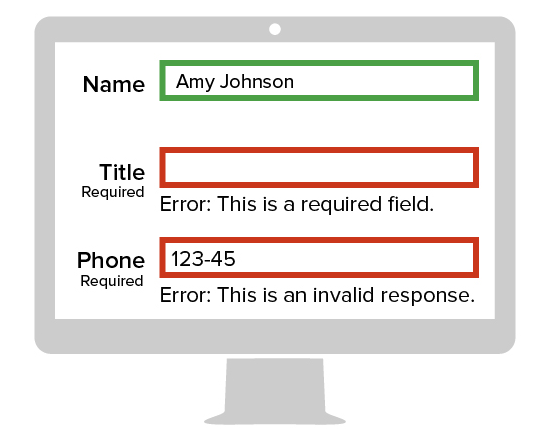
Image of a computer monitor using color and text as dual indicators.

Combining color with text is recommended so that all users can understand the message that you are trying to convey. Identifying required fields with the full word "Required" is recommended over using asterisks.


Weible noted that haptics, the science of touch, offers many exciting possibilities for increasing access. Researchers have developed sensory touch screens that provide tactile feedback, allowing the user to feel bumps and variations across a screen. This capability, though just being developed, offers such possibilities as Braille lettering to making a map discernible.

[SHRM members-only toolkit: Accommodating Employees' Disabilities]

Website/ICT Policies

Companies should adopt accessibility policies and share them internally and externally, recommended Carol Glazer, president of the National Organization on Disability in New York City.

PEAT notes that under settlement agreements reached with the Department of Justice under Title III of the ADA, the department has specified methods to implement website accessibility.

These methods include:

  • Adopting and distributing a website/information and communication technologies (ICT) policy.
  • Conducting a written evaluation by an independent website-accessibility consultant on conformance with WCAG.
  • Providing a notice about the accessibility policy that is prominently and directly linked from the website home page. The notice should include a toll-free telephone number and e-mail address so that people with disabilities who are experiencing technical difficulties can request assistance. Those staffing the phone line and receiving the e-mails should be knowledgeable about the policy.
  • Training employees and contractors who have responsibilities related to the website/ICT policy. That includes those who design, develop, procure and maintain the ICT.
  • Designating an employee who reports directly to a high-ranking official as the website accessibility coordinator.

People with different disabilities also might test websites to identify any barriers not otherwise apparent. Test websites with a variety of screen readers to ensure accessibility, Weible said.

Prioritization

Glazer recommended that employers set a plan to achieve accessibility and define clear and measurable milestones, including dates by which each will be met.

"In some cases, a phased approach might be appropriate. First, quickly fix significant accessibility barriers. Then implement fixes for other issues," she said.

She suggested that employers perform a third-party audit before launching. Glazer observed that ensuring web access from the outset can be much more cost-efficient than seeking to retrofit an inaccessible site. She emphasized that companies with accessible hiring websites "can gain a competitive edge in courting talent with disabilities and improving the overall employee experience."

Weible said making websites accessible "is an ongoing process, not a destination."

Compliance
Employment Law & Compliance
Labor & Employee Relations
Recruiting
Workforce Planning

Was this resource helpful?

Leave Feedback

Related Articles

(opens in a new tab)
News
How One Company Uses Digital Tools to Boost Employee Well-Being

Learn how Marsh McLennan successfully boosts staff well-being with digital tools, improving productivity and work satisfaction for more than 20,000 employees.

(opens in a new tab)
News
A 4-Day Workweek? AI-Fueled Efficiencies Could Make It Happen

The proliferation of artificial intelligence in the workplace, and the ensuing expected increase in productivity and efficiency, could help usher in the four-day workweek, some experts predict.

(opens in a new tab)
News
Rising Demand for Workforce AI Skills Leads to Calls for Upskilling

As artificial intelligence technology continues to develop, the demand for workers with the ability to work alongside and manage AI systems will increase. This means that workers who are not able to adapt and learn these new skills will be left behind in the job market.

Workplace Compliance Newsletter

Keep abreast of employment law and compliance developments and their wide-reaching impacts.

Success title

Success caption

Manage Subscriptions
Our Brands

SHRM Foundation Logo
SHRM Executive Network Logo
CEO Circle Logo
SHRM Business Logo
SHRM Linkage Logo
SHRM Labs
Overview


  • About SHRM
  • SHRM India Advisory Council
  • Careers at SHRM
  • Press Room
  • Contact SHRM India
  • Book a SHRM Executive Speaker
  • Ask an Advisor
  • SHRM Newsletter
  • Post a Job
  • Find an HR Job
  • Advertise with us
  • Copyright & Permission
Contact Us


Email: shrmindia@shrm.org
Phone: (1)800.103.2198
WhatsApp: +919810503727

SHRM India Corporate Information

© 2026 SHRM. All Rights Reserved
SHRM provides content as a service to its readers and members. It does not offer legal advice, and cannot guarantee the accuracy or suitability of its content for a particular purpose. Disclaimer

Follow Us

  • LinkedIn
  • Facebook
  • Twitter
  • Instagram
  • YouTube

  1. Your Privacy Choices

  2. Terms of Use

  3. Accessibility

Join SHRM for Exclusive Access to Professional Content

SHRM Members enjoy unlimited access to articles and exclusive professional content resources.

membership icon image

Unlimited Resources:
Grow your knowledge across core and emerging topics

membership icon image

Access to Advisors:
Make informed decisions quickly with expert-backed direction

membership icon image

Industry-Trusted Research:
Use data and insights leaders actually care about


View Member Benefits Guide

Already a member? Login
Free Article

Login to unlock unlimited access or join SHRM today to get unlimited access to articles and member-exclusive resources.

Already a member? Login
Limit Reached

You've reached the limit of 1 free article this month. Join to access unlimited articles and member-only resources.

Already a member? Login
Free Article

Login to unlock unlimited access or join SHRM today to get unlimited access to articles and member-exclusive resources.

Already a member? Login
Exclusive Executive-Level Content

You've reached the limit of 1 free article this month. Join the Executive Network and enjoy unlimited content.

Already a member? Login
Unlock Your Career with SHRM Membership

Please enjoy this free resource! Join SHRM for unlimited access to exclusive articles and tools.

Already a member? Login
Join SHRM for Exclusive Access to Professional Premium Content

SHRM Members enjoy unlimited access to articles and exclusive member resources.

Already a member? Login
Join SHRM for Exclusive Access to Student Content

SHRM Members enjoy unlimited access to articles and exclusive member resources.

Already a member? Login
Join SHRM for Exclusive Access to Executive Network Content

SHRM member enjoys unlimited access to articles and exclusive member resources.

Already a member? Login

Your membership is almost expired! Renew today for unlimited access to member content.

Renew now

Your membership has expired. Renew today for unlimited access to member content.

Renew Now

Your Executive Network membership is nearing its expiration. Renew now to maintain access.

Renew Now

Your membership has expired. Renew your Executive Network benefits today.

Renew Now